Eliminating the Blind-Routing Bottleneck: How Octopus Energy Scales Email Support
You open your shared inbox at 8:30 AM. There are 142 unread emails from customers. Half of them are asking for a copy of an invoice. A quarter are complaining about a delivery. The rest are a chaotic mix of missing account numbers, typos, and billing disputes.
Your ops team will spend the next four hours just reading, tagging, and routing these emails before they solve a single problem.
Octopus Energy faced a scaled-up version of this exact nightmare during the energy crisis. They could not hire fast enough to handle the volume. So they built a generative AI tool called Magic Ink into their Kraken platform to triage and draft responses.
It now handles 45% of their customer emails. The AI-generated emails hit an 80% customer satisfaction rate. Human agents sit at 65%.
This is how they did it, and how you can build the same architecture for your SME.
The blind-routing bottleneck
The blind-routing bottleneck is the hidden cost of paying humans to read, categorise, and manually retrieve data for incoming emails before any actual problem-solving begins.
Every morning, your accounts assistant opens an email. It says, "My bill is wrong." There is no account number. The sender's email address does not match the one in Xero.
The assistant stops. They search your CRM for the domain name. They find three different contacts. They cross-reference the company name in Xero. They finally locate the account, open the latest invoice, and realise the customer is looking at a pro-forma from three months ago.
Fifteen minutes have passed. Zero value has been created. The assistant has only just acquired the context needed to start typing a reply.
This is the reality of SME customer service. The work is not solving the problem. The work is finding the information required to understand the problem.
When you scale, this bottleneck scales linearly. You double your customer base, you double the noise in the inbox. You hire more juniors. They spend their days acting as human routers, dragging emails into folders and copying data between browser tabs.
It drains morale. Nobody takes a job to be a manual data bridge between Outlook and Xero.
Founders watch their wage bills climb while response times drop. The natural instinct is to buy an AI tool to fix it. But because they misunderstand the actual mechanics of the bottleneck, their first attempt almost always fails. They try to automate the writing, when they should be automating the reading.
Why the obvious fix fails
Slapping a basic Zapier integration onto your shared inbox fails because it treats customer emails as structured data when they are inherently chaotic.
Most SMEs try the same obvious fix. They connect a Gmail trigger in Zapier to an OpenAI step. They write a prompt saying, "Read this customer email and draft a polite reply." Then they push the draft back to Gmail.
This is a disaster.
The AI has no context. It does not know the customer's balance. It does not know their shipping status. It only knows what is in the raw email text. So it hallucinates a confident, polite response that is entirely wrong, or it writes a useless generic reply asking the customer for their account number.
You infuriate your customers. You abandon the project. You decide AI is not ready for prime time.
The failure goes deeper than bad prompts. It is a structural failure in how basic automation tools handle unstructured text. Zapier's native email parsing relies on fixed fields and predictable formatting.
When a customer replies to a thread but leaves their actual message buried three paragraphs down beneath a massive corporate signature, the parser fails. When a supplier sends a custom contact field two levels deep in an email signature, the extraction silently writes a null value.
The automation skips the step. The ticket dies in the system. You only notice at month-end when the customer leaves a one-star review.
In my experience reviewing SME ops, the pattern I keep seeing is a total reliance on naive, single-step AI calls. Founders want a magic box that reads an email and fixes the problem in one go.
Not a magic box. A system. You need to pull the live context from your databases before you ever ask the AI to write a word. A £25/month ChatGPT subscription cannot replace a £35k salary if you do not wire it into your actual business data.
The approach that actually works

A functional AI triage system separates the extraction of intent from the generation of the response, using distinct API calls to pull live context from your databases.
Octopus Energy succeeded because they integrated their AI tool directly into the foundation of their platform. It has maximum context available natively, pulling data from the entire customer lifecycle.
You can replicate this architecture using Make or n8n.
Here is what actually happens in a working build.
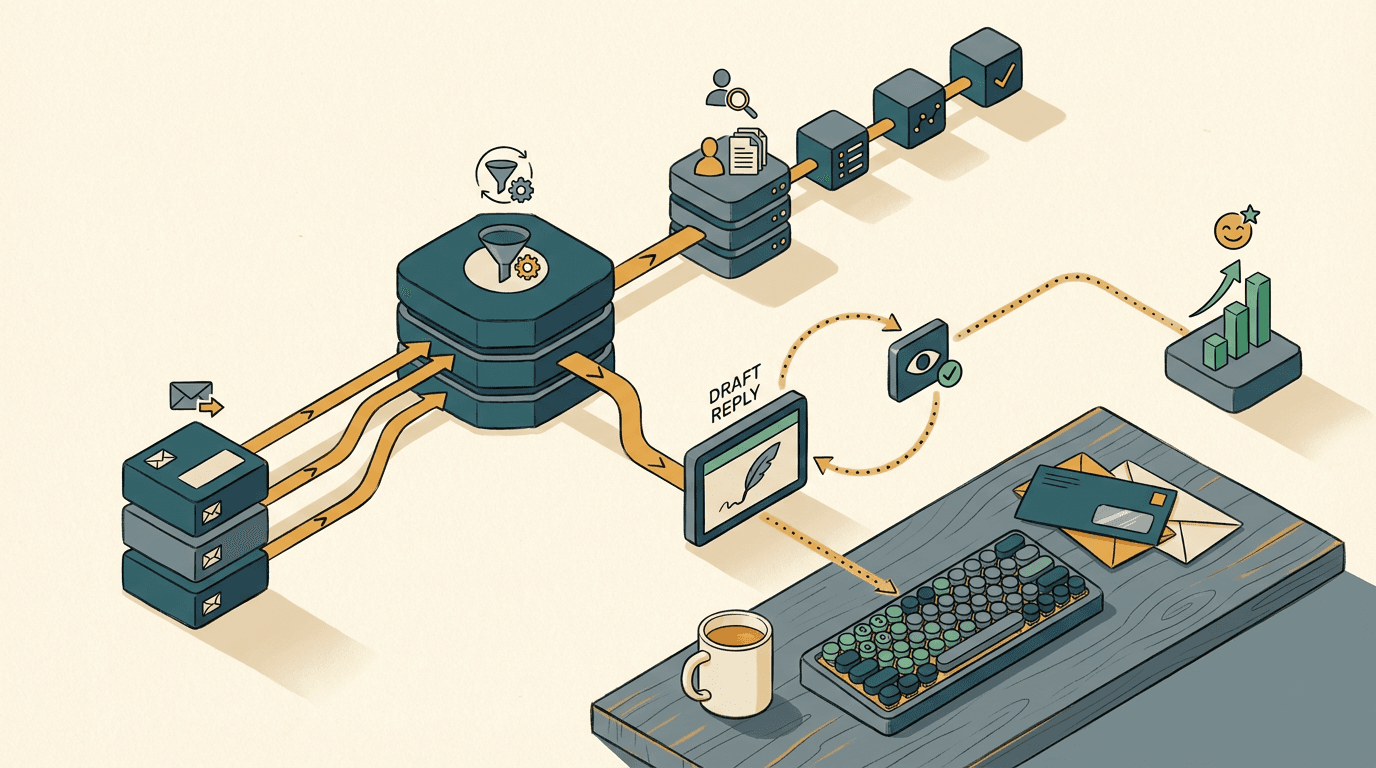
Step one is ingestion. A webhook in Make catches the incoming Gmail or Outlook message. It strips out the HTML, the inline images, and the signature junk, leaving just the raw text.
Step two is extraction. You send this clean text to Claude via API. You do not ask Claude to write a reply. You enforce a strict JSON schema and ask it to extract three things: the customer's intent, the urgency, and any identifying details like an invoice number or company name.
Step three is context retrieval. Make takes that extracted invoice number and queries Xero. It pulls the live balance, the due date, and the line items. It then queries HubSpot to find the account manager's name and the customer's recent ticket history.
Step four is generation. You make a second call to Claude. You feed it the original email, the Xero data, and the HubSpot data. Now, you ask it to draft the reply.
Because it has the facts, it writes a perfect, highly specific response. It saves this draft in your helpdesk. A human reads it, clicks approve, and moves on.
Here is a real scenario: A customer emails to say their direct debit bounced because they are in hospital.
Because the system fetched the Xero data, the AI knows the balance is £150. It knows the account history. It drafts a response that pauses the collection.
Greg Jackson, founder of Octopus Energy, noted that generative AI has "turbocharged the power of the human" in exactly these moments. He saw an AI draft to a sick customer that opened with: "At times like this, there are more important things to worry about than your energy bills. First and foremost, I hope your health is improved."
The AI ended with the same empathy. It works because the data is accurate.
To build this yourself, expect 2-3 weeks of build time. It costs £6k-£12k depending on how clean your existing Xero and HubSpot integrations are.
The known failure mode here is the AI hallucinating a specific policy date. You catch this by keeping the human in the loop. The AI drafts. The human approves. You eliminate the blind-routing bottleneck without risking your reputation.
Where this breaks down
Generative AI triage breaks down completely when your core customer data lives in systems that lack open APIs.
I check this before committing to any build. If your customer data is trapped in an on-premise legacy database, the LLM has no way to retrieve the live context. It cannot check the balance. It cannot see the shipping status.
Without that context, the entire architecture collapses. You are back to the obvious, failing fix: a generic chatbot that asks annoying questions.
You also hit a wall with unstructured attachments. If your invoices come in as scanned TIFFs from a legacy accounting system, you need an OCR step first.
Once you add OCR to read bad handwriting or low-resolution scans, the error rate jumps from 1% to around 12%. The AI extracts the wrong invoice number. It queries Xero for an invoice that does not exist. The automation fails, and the ticket requires manual intervention anyway.
Another breaking point is highly regulated advice. If your customer is asking for specific legal or financial compliance guidance, do not let the AI draft the technical specifics. The risk of a confident hallucination is too high.
If your data is not accessible via a clean API, fix your data layer first. Do not try to paper over a broken database with a smart LLM. It will just fail faster.
Three mistakes to avoid
You now know the mechanics of a working AI triage system. When you start building, avoid these specific traps.
- DON'T let the AI hit send automatically. Always keep a human in the loop. If you bypass the draft stage and let the API send emails directly to customers, a hallucination will eventually reach a client. The AI might promise a refund you do not offer or invent a delivery date. Route the AI's output into your helpdesk or Gmail as a saved draft. Your team reviews, edits if necessary, and clicks send.
- DON'T use a single prompt for the whole process. Avoid the temptation to cram extraction, reasoning, and drafting into one massive API call. When you ask an LLM to do too much at once, it loses focus and hallucination rates spike. Break the job down. Use one call with a JSON schema to extract the data. Run your API lookups. Then use a separate, fresh call to draft the response.
- DON'T try to automate the angry complaints first. Start with the high-volume, low-emotion tickets. Automate the requests for invoice copies, the shipping status updates, and the password resets. These require simple database lookups and carry zero emotional risk. If the AI messes up a password reset draft, the human agent just deletes it. Leave the complex, multi-thread disputes to your senior staff until the system proves itself.
Get our UK AI insights.
Practical reads on AI for UK businesses — teardowns, how-to guides, regulatory news. Unsubscribe anytime.
Unsubscribe anytime.